IRS E File Status: How to Check Accepted, Rejected, Pending
If you just e-filed Form 2290 and you are refreshing your inbox or portal, you are not alone. For most truckers and fleet owners, IRS e file status comes down to one question: “Did the IRS accept my return so I can get my stamped Schedule 1 for IRP or DMV?”
This guide breaks down the three statuses you will see most often (Accepted, Rejected, Pending), what they really mean, how long each typically takes, and what to do next so your registration does not get stuck.
What “IRS e file status” means for Form 2290
When you e-file Form 2290 through an IRS-authorized provider, your return is transmitted electronically to the IRS. The IRS then sends back an electronic acknowledgment (often called an “ack”) that confirms whether the return was accepted or rejected.
For Form 2290 filers, the practical impact is simple:
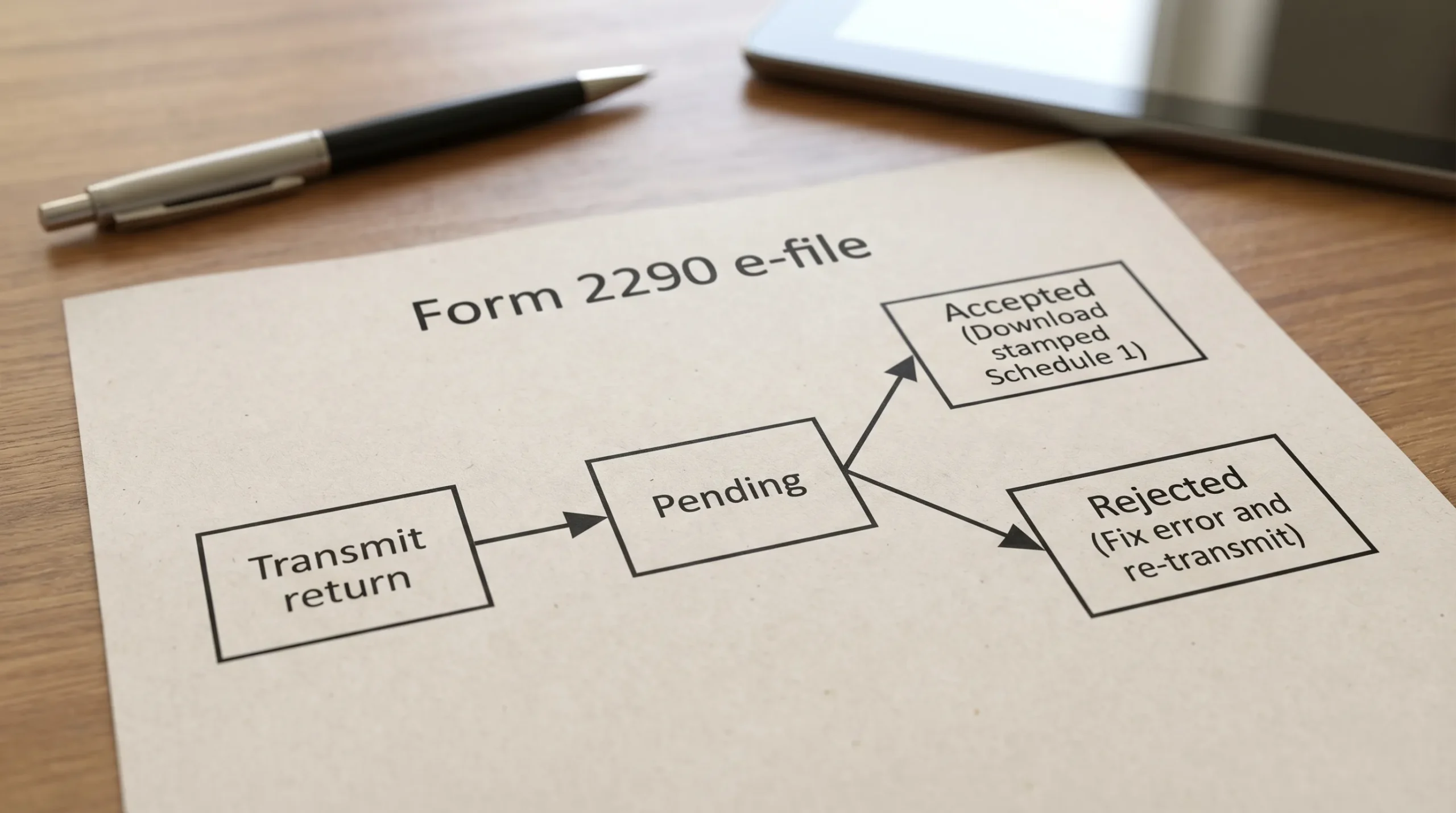
- Accepted usually means you can download your IRS-stamped Schedule 1 (your proof of filing and payment for registration).
- Rejected means the IRS did not accept the return, and you must fix something and retransmit.
- Pending means you are still waiting for the IRS acknowledgment.
If you want a Form 2290-specific walkthrough focused on portal steps, see: How to Check 2290 Filing Status.
The most common IRS e-file statuses (and what to do)
Different e-file platforms may label statuses slightly differently, but they usually map to the same IRS acknowledgment states. Use the table below to quickly diagnose what is happening.
| Status you see | What it means | What you should do now | When to escalate |
|---|---|---|---|
| Pending | The return was sent, but the IRS has not yet responded with an acknowledgment. | Wait a bit, then re-check your dashboard/email. Avoid re-submitting the same return. | If it stays pending unusually long (especially past a business day during normal periods), contact your provider support. |
| Accepted | The IRS accepted your Form 2290. | Download and save the stamped Schedule 1. Keep a copy for IRP/DMV and your records. | If you cannot find Schedule 1 after acceptance, contact your provider for retrieval help. |
| Rejected | The IRS did not accept the return due to an error or mismatch. | Open the rejection details, correct the issue, and re-transmit. | If you cannot identify the issue (or it repeats), contact provider support before repeatedly re-filing. |
| Transmitted / Sent | Your provider has sent the return to the IRS system (often appears briefly before Pending). | No action needed other than monitoring. | Escalate only if it never moves to an IRS response status. |
| Returned / Not accepted | Provider-specific wording that generally indicates rejection or a failed transmission. | Review messages and fix any listed errors. | Contact support if you are unsure whether the IRS received it. |
How long does IRS e-file status take for Form 2290?
In many cases, Form 2290 acknowledgments come back quickly, sometimes within minutes. However, timing can vary based on:
- Peak season volume (especially July and August)
- IRS system load or maintenance windows
- Payment method workflows (some payments settle separately)
- Data mismatches that trigger rejection
If you are filing close to the deadline, build in buffer time. The HVUT tax year runs July 1 to June 30, and deadlines depend on the vehicle’s First Used Month. For key dates, see: Form 2290 due dates.
Status: Accepted (what it means and what to do next)
Accepted is the status you want. For Form 2290, acceptance is the moment your filing becomes official in the IRS system.
What you should do immediately after acceptance
-
Download your stamped Schedule 1 and store it where you can access it quickly (phone, email, cloud drive, dispatch office).
-
Verify the details before you head to IRP/DMV:
- EIN is correct
- VIN(s) match your registration documents
- Tax year is correct
- Vehicle weight category is correct
- Keep your confirmation emails (or dashboard acknowledgment) as backup.
If you ever need to retrieve proof later, this guide may help: How to get a copy of my IRS 2290 form.
Common “Accepted but I still need help” situations
- You cannot find the email with Schedule 1: check spam/junk and the email address on your account.
- You filed multiple vehicles: make sure you downloaded the correct Schedule 1 for the right filing.
- You used EFTPS: your IRS acceptance still matters for Schedule 1, but your payment scheduling and settlement happen in EFTPS (a separate workflow). For timing tips, see: When is EFTPS payment due for Form 2290.
Status: Pending (why it happens and what not to do)
Pending means the return is in progress and you are waiting for the IRS acknowledgment.
Why your Form 2290 might be pending
Pending is often normal, especially during:
- High-volume periods (deadline days and peak season)
- Short IRS processing delays
- Brief provider-to-IRS transmission queues
What not to do while pending
The biggest mistake is to panic and file again.
If you transmit a second return while the first is still pending, you can create:
- Duplicate filing problems
- Confusion about which submission is the valid one
- Extra time spent resolving issues
What to do while pending
- Give it time and keep checking your dashboard status.
- Confirm you can access your account and notifications.
- If pending persists longer than expected, contact your e-file provider support with your filing details so they can check transmission and acknowledgment logs.
Status: Rejected (what it means and the fastest way to fix it)
Rejected means the IRS did not accept your return. This is frustrating, but it is usually fixable quickly if you know what to look for.
The most common reasons a Form 2290 gets rejected
Rejections typically happen because the IRS system checks your e-filed return against IRS records and basic validation rules. Common issues include:
- EIN and business name mismatch (the IRS requires the legal name to match what is on file)
- New EIN timing (a newly issued EIN may take time to become active in IRS e-file systems)
- VIN errors (missing characters, transposed digits, invalid format)
- Wrong tax period or First Used Month
- Duplicate filing (the IRS already has an accepted return for the same EIN, VIN, and tax period)
- Weight category issues (selecting the wrong taxable gross weight category)
If you recently obtained an EIN, review this guidance: How to apply for an EIN online for Form 2290 filing.
How to respond to a rejection (practical workflow)
Start by reading the rejection message inside your e-file account. Then:
- Correct the exact field(s) identified (often EIN/business name, VIN, or month).
- Re-transmit the corrected return through the same provider.
- Monitor status again until you see Accepted.
If the rejection involves VIN data and you already know the correct VIN, you may need to file a correction depending on what was submitted originally. For platform-based guidance, see: How to do VIN correction for free.
When you should pause and ask for help
If you are getting repeated rejections after fixing the obvious typos, stop and confirm these items before re-submitting again:
- Your EIN is correct and active
- Your business legal name matches IRS records (not a DBA, not a shortened version)
- Your VIN matches the vehicle title/registration exactly
If you need IRS contact points specific to Form 2290, use: IRS customer support phone numbers.
How to check IRS e file status (fastest methods)
If you e-filed through an IRS-authorized provider
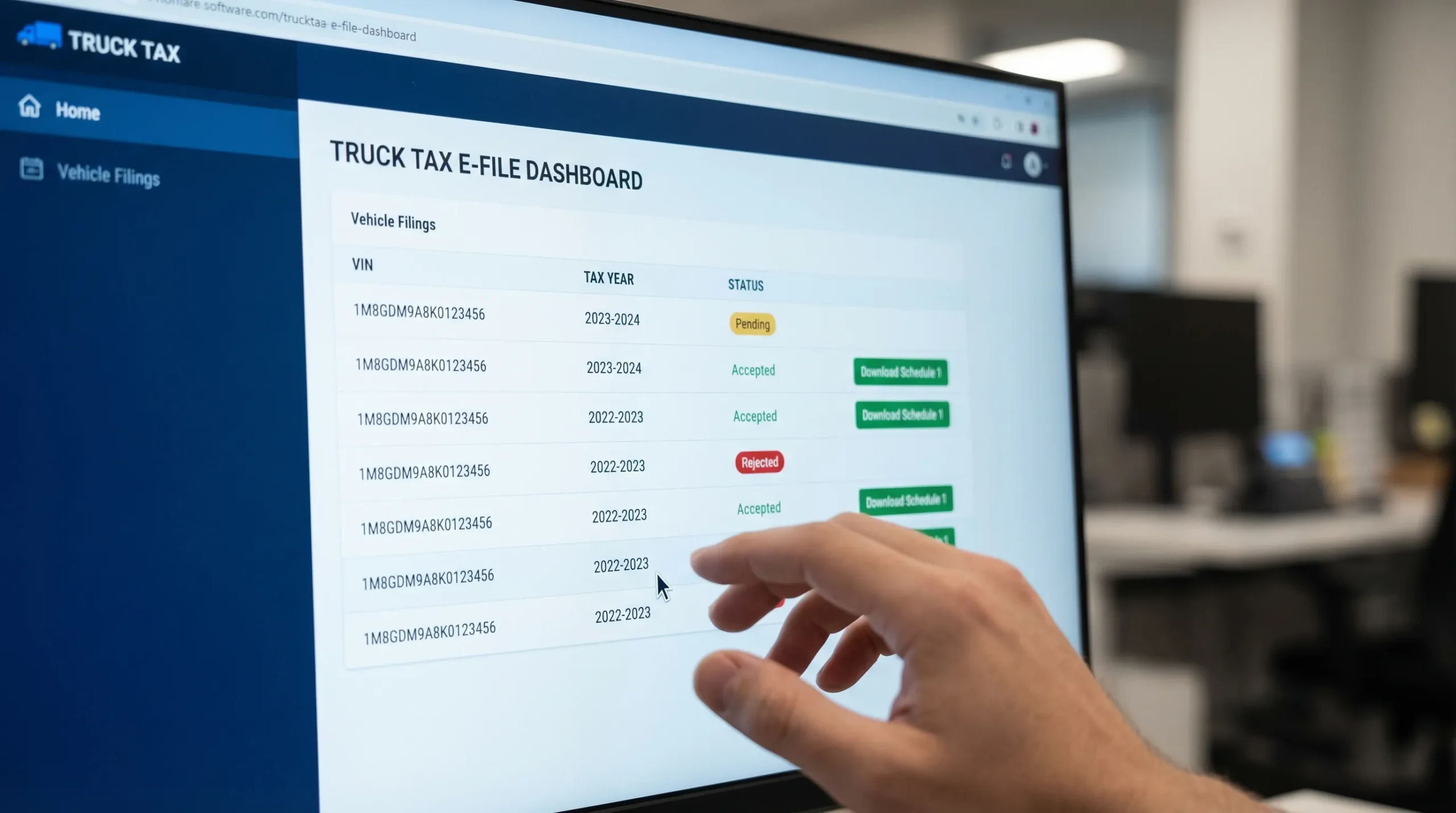
In most cases, the fastest way to check is inside your provider dashboard because it shows the real-time IRS acknowledgment results.
For Simple Form 2290 filers, you typically:
- Log in to your account
- Open your dashboard or filings list
- Locate the return for the correct tax year
- Check the status (Pending, Accepted, Rejected)
- Download Schedule 1 once accepted
If you are filing multiple trucks, a dashboard view is especially helpful because it lets you track each submission without mixing up VINs.
If you filed Form 2290 by mail (paper filing)
Paper filing status is harder to track quickly because processing is manual and mail delivery adds time. The IRS may take weeks during busy periods.
If you mailed your return and need proof quickly for registration, the most reliable solution is usually to e-file through an IRS-authorized provider to obtain stamped Schedule 1 faster.
For mailing details (addresses and what to expect), see: IRS mailing address for Form 2290.
Accepted vs. payment confirmed: a common confusion
For HVUT, your filing status and your payment method can move on different timelines.
- If you pay by direct debit (electronic funds withdrawal), your return can be accepted and your payment is initiated as part of the process.
- If you pay by EFTPS, you typically e-file first, then schedule the payment in EFTPS (so you must manage both steps).
- If you pay by check/money order, there is mailing time involved even if your return was filed.
For official IRS background on Form 2290 and HVUT, you can also review the IRS resource page: Heavy Highway Vehicle Use Tax (Form 2290).
Prevent status problems before you file (quick pre-check)
Most “Rejected” returns are preventable. Before you transmit, verify:
- EIN (not SSN) and legal business name match IRS records
- VINs are copied exactly from registration or title
- First Used Month is correct for the vehicle
- Taxable gross weight category is correct
If you want a deeper checklist of common pitfalls, see: What are the most common HVUT Form 2290 filing mistakes?
Frequently Asked Questions
What does IRS e file status “Accepted” mean? It means the IRS has received and accepted your electronically filed return. For Form 2290, acceptance is what allows you to access your IRS-stamped Schedule 1 proof for registration.
What does “Pending” mean on my Form 2290 e-file status? Pending means the return has been transmitted and you are waiting for the IRS acknowledgment. During peak filing periods, pending can last longer than usual.
Can I re-file if my IRS e file status is pending? It is usually not a good idea to re-file while pending because it can create duplicate submissions. Wait for the IRS response or contact your provider support if the pending status persists.
Why was my Form 2290 rejected? Common reasons include EIN and business name mismatch, VIN errors, wrong First Used Month, duplicate filing, or incorrect tax period selection.
How do I check my IRS e file status the fastest? If you e-filed, the fastest method is typically your IRS-authorized provider dashboard, which shows the IRS acknowledgment (Accepted or Rejected) and provides Schedule 1 download after acceptance.
File Form 2290 and track your IRS e file status in one place
If your Schedule 1 is holding up IRP or DMV registration, speed and accuracy matter. Simple Form 2290 is an IRS-authorized e-file provider that helps truckers and fleet owners file Form 2290 online, track IRS acknowledgment status (Pending, Accepted, Rejected), and download Schedule 1 once accepted.
Get started here: File Form 2290 online with Simple Form 2290
Disclaimer: This article is for general information only and is not tax advice.