IRS Where to File: Online vs Mail for Faster Processing
If you are searching “IRS where to file” for Form 2290 (Heavy Vehicle Use Tax, HVUT), the real question is usually this: Should I file online or mail it in, and which option gets my stamped Schedule 1 the fastest?
For most truck owners and fleet managers, speed matters because Schedule 1 is your proof of filing for IRP registration, tags, and renewals. Below is a practical, trucker-focused comparison of online (e-file) vs mail (paper filing), including processing timelines, common delays, and how to choose the right method.

What “IRS where to file” means for Form 2290
The IRS accepts Form 2290 in two main ways:
- E-file (online) through an IRS-authorized e-file provider (the most common option for faster processing).
- Paper file (mail) by sending Form 2290 to the IRS (the correct mailing address depends on how you pay).
The IRS maintains general Form 2290 information here: About Form 2290. For the official rules, details, and payment methods, you can also reference the IRS Instructions for Form 2290.
Filing Form 2290 online (e-file): fastest for most truckers
How online filing works
When you e-file, your return is transmitted electronically to the IRS through an authorized provider. After the IRS accepts it, you receive your stamped Schedule 1 (the watermarked proof) much faster than waiting on mail processing.
A typical e-file flow looks like this:
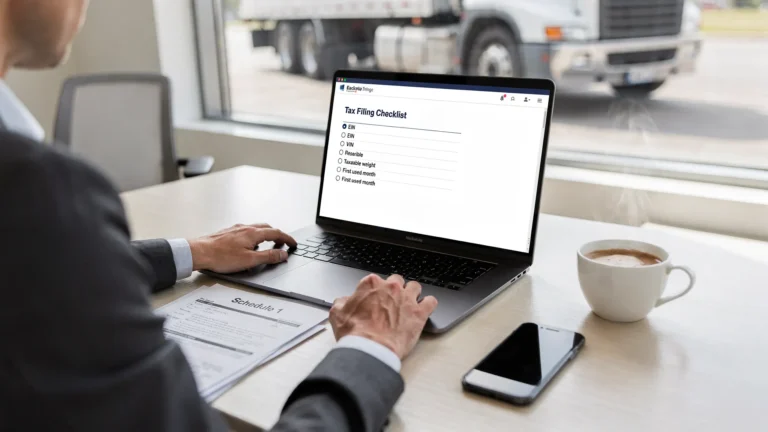
- Enter business details (including EIN) and tax period
- Add vehicle information (VIN, taxable gross weight, first used month)
- Choose your IRS payment method (for example, EFTPS or electronic funds withdrawal, depending on your filing setup)
- Submit, then download or receive Schedule 1 after IRS acceptance
Typical turnaround time
Online filing is designed for speed. In many cases, IRS acceptance and Schedule 1 delivery can happen the same day, often within minutes, as long as your return is complete and not rejected.
When e-file is strongly recommended
E-file is usually the best choice when:
- You need Schedule 1 quickly for registration, renewals, or IRP
- You are filing for multiple vehicles
- You want fewer manual errors (VIN typos, math mistakes, missing fields)
- You prefer electronic record storage and easy re-downloads
Also note: the IRS requires electronic filing when reporting 25 or more vehicles on a Form 2290 return (this threshold is stated in IRS Form 2290 guidance and instructions).
Filing Form 2290 by mail: slower, but sometimes used
How paper filing works
Paper filing means you complete Form 2290 and mail it to the IRS. The correct IRS address depends on whether you include a payment (for example, a check or money order) or you pay using an electronic method.
Because IRS mailing addresses can change and depend on payment type, it is smart to confirm the current addresses before you send anything. You can use this reference page: IRS mailing address for Form 2290.
Typical turnaround time
Paper processing is usually much slower than e-file. Many truckers plan for several weeks for paper returns to be processed, and it can take longer during peak HVUT season (the annual rush around late summer).
If you are on a deadline for plates, IRP, or a new truck on the road, paper filing is where most delays happen.
When mailing might make sense
Mail filing may be considered if:
- You are comfortable with paper forms and do not need Schedule 1 urgently
- You have a situation that requires extra documentation and you prefer to send a full paper packet (still confirm IRS requirements first)
- You are correcting issues and have been specifically instructed by the IRS to respond by mail
Even in these cases, many filers still prefer e-file for confirmation, status visibility, and faster proof.
Online vs mail: side-by-side comparison
Here is a practical comparison focused on what most truckers care about: speed, proof of filing, and avoiding headaches.
| Factor | Online (e-file) | Mail (paper filing) |
|---|---|---|
| Processing speed | Often same-day IRS acceptance when accepted | Often takes weeks, longer in peak season |
| Schedule 1 (proof) | Delivered electronically after IRS acceptance | Stamped Schedule 1 returned after processing |
| Error risk | Lower (guided steps, validations) | Higher (manual mistakes, missing signatures, wrong address) |
| Best for | Urgent IRP/DMV needs, fleets, repeat filers | Non-urgent filings, special mail-only situations |
| Visibility | Clear status updates (accepted, rejected, pending) | Limited tracking, typically wait then call if needed |
How to decide where to file (quick decision guide)
If you are choosing based on real-world trucking situations, these rules of thumb help.
Choose online filing if you need Schedule 1 fast
If you are:
- Registering a newly purchased truck
- Renewing plates close to the deadline
- Trying to avoid downtime
Online filing is almost always the better option because it is built to get you stamped Schedule 1 without waiting on mail processing.
Choose online filing if you have multiple vehicles
Fleet filing adds complexity fast. E-file tools built for fleets reduce data-entry time and make it easier to retrieve prior-year filings.
Choose mail only if you can afford delays
If you are well ahead of deadlines and do not need proof quickly, mail can work. Just be prepared for longer timelines and less visibility.
Avoid delays: the biggest mistakes that slow processing
No matter where you file, most processing problems come from a small set of preventable issues.
EIN problems (especially for new businesses)
If your EIN is brand new, the IRS systems may need time to recognize it for e-filing. Many filers wait about two weeks after EIN issuance before attempting to e-file to reduce rejections.
If you need help getting an EIN, see: How to apply for an EIN online for Form 2290 filing.
VIN mismatches and typos
A single incorrect character in a VIN is enough to trigger a rejection or create registration problems later. Double-check VINs carefully before submitting.
If you already filed and discovered a VIN mistake, you may need a correction amendment. (Many e-file platforms support VIN corrections as a separate workflow.)
Wrong first used month (FUM)
The first used month determines your filing and payment obligation timing and can affect how much tax is due. Incorrect FUM selection is a common reason returns get corrected or re-filed.
To keep timing straight, refer to: Form 2290 due dates.
Payment method confusion
Form 2290 can be paid in several IRS-approved ways (for example, EFTPS, electronic funds withdrawal, check or money order). The key is to match your filing method and payment method correctly, and follow IRS instructions.
For EFTPS background from the IRS: EFTPS (Electronic Federal Tax Payment System).
If you already filed: how to check your Form 2290 status
If you e-filed, the fastest way to confirm progress is usually inside your e-file account, where you can see whether the IRS marked your return as Accepted, Rejected, or Pending, and download Schedule 1 when available.
This guide walks through both e-file and paper status checks: How to check 2290 filing status.
A faster way to file online: Simple Form 2290
If your priority is getting Schedule 1 quickly without wrestling with paperwork, using an IRS-authorized provider can remove a lot of friction.
With Simple Form 2290, you can file online through a guided process and get:
- Instant Schedule 1 delivery after IRS acceptance
- Bulk vehicle filings for fleets
- Step-by-step guided filing to reduce errors
- Secure data storage and retrieval
- Professional customer support, including English and Spanish
To see the full e-file process, visit: How to e-file Form 2290 with Simple Form 2290.

Frequently Asked Questions
IRS where to file Form 2290, online or by mail? You can file Form 2290 online using an IRS-authorized e-file provider, or mail a paper return to the IRS. Online filing is usually faster for getting Schedule 1.
Is e-filing Form 2290 required for fleets? The IRS requires e-filing if you are reporting 25 or more vehicles on a Form 2290 return. Even below that, many owners choose e-file for speed and easier tracking.
How long does it take to get Schedule 1 if I mail Form 2290? Paper processing often takes several weeks and may take longer during peak HVUT season. If you need proof quickly for registration, e-file is typically faster.
What is the most common reason an online Form 2290 gets rejected? Common causes include EIN issues (especially newly issued EINs), VIN errors, duplicate filings, or mismatched business information.
Where do I find the correct IRS mailing address for Form 2290? The address depends on whether you include a payment and the type of payment. Use this reference to confirm the latest addresses before mailing: https://www.simpleform2290.com/irs-mailing-address-for-form-2290.
File online and get Schedule 1 faster
If you are trying to avoid registration delays and want a quicker IRS acceptance path, e-filing is usually the simplest answer to “IRS where to file.” You can file in minutes with an IRS-authorized provider and receive your stamped Schedule 1 electronically.
Get started here: File Form 2290 online with Simple Form 2290.