How to Check Your DOT Compliance Status Online (Complete 2026 Guide)
DOT compliance is no longer something you “find out” at a weigh station. In 2026, most of the signals that can delay loads, spike insurance, or block renewals (authority status, insurance filings, safety data, and even tax proof for IRP) are checkable online in minutes.
If you’re asking, “how do i check my dot compliance”, the key is to look in the right FMCSA systems and then interpret what you see like an operator, not like a bureaucrat.
What “DOT compliance status” really means in 2026
Most drivers use “DOT compliant” as shorthand for “I won’t get shut down.” Online, that breaks into a few distinct categories, each with its own system of record.
| Compliance area | What you’re verifying | Where to check online | Why it matters fast |
|---|---|---|---|
| USDOT registration | Entity, address, status, basic carrier details | FMCSA SAFER snapshot | Inactive/incorrect info can trigger stops, onboarding issues, and renewal friction |
| Operating authority (MC) | Active authority and type | FMCSA Licensing & Insurance | Brokers and shippers often screen authority and insurance before dispatch |
| Insurance filings | On-file and current policy filings | FMCSA Licensing & Insurance | Lapses can put authority at risk and disrupt onboarding |
| CSA/SMS safety data | BASIC percentiles, inspection and crash trends | FMCSA SMS | High-risk patterns can increase scrutiny and affect business costs |
| Data accuracy | Disputes and corrections for inspections/crashes | FMCSA DataQs | Incorrect data can haunt you until it’s challenged |
| IRP readiness | Registration renewal prerequisites | Your IRP jurisdiction portal (varies) | Many jurisdictions require Form 2290 Schedule 1 as proof of HVUT payment |
A practical way to think about DOT Compliance is: Registration + Authority/Insurance + Safety data + Fix loop.
The minimum info you should gather before checking
To avoid wasted time (and false “no records found” results), gather these first:
- Your USDOT number (and MC number if you have operating authority).
- Legal business name and address as filed on MCS-150.
- Your vehicle identification number (VIN) list (especially if you’re doing IRP work).
- Your current Form 2290 Schedule 1 (stamped proof of HVUT payment), commonly needed for irp truck registration.
This is also where fleet operators get leverage from disciplined recordkeeping. When you can pull your HVUT proof instantly (instead of hunting emails), IRP becomes a paperwork step, not a downtime event.
Step 1: Check your public carrier snapshot (fastest “are we visible?” check)
Start with the FMCSA SAFER Company Snapshot. It’s the quickest way to validate that your carrier identity is searchable and consistent.
What to look for:
- USDOT status indicators (for example, whether the carrier shows as active/inactive).
- Correct legal name and address (mismatches create broker onboarding delays).
- Basic operational details that tie back to your filings.
Strategic lesson learned (especially for small fleets): the snapshot is often what other parties see first. Think of it like your public compliance “landing page.”
Step 2: Confirm operating authority and insurance filings (the “can you legally run?” layer)
Next, check FMCSA Licensing & Insurance. This is where compliance becomes business critical, because authority and insurance issues can stop dispatch even when the trucks are ready.
Use: FMCSA Licensing & Insurance (L&I)
What to verify:
- Authority is active (and the correct type for your operation).
- Insurance filings show as on-file and current.
Investor-style insight (why this matters beyond tickets): lenders, factoring companies, and M&A buyers commonly treat authority and insurance continuity as due diligence basics. A “compliance wobble” can raise perceived risk even if the operation is otherwise profitable.
Step 3: Review CSA/SMS for trends (not just “good” or “bad”)
Your DOT Compliance posture is increasingly data-driven. The FMCSA’s Safety Measurement System (SMS) uses roadside inspection, crash, and violation data over time (generally a rolling window) to help prioritize interventions.
Use: FMCSA SMS
How to read it strategically:
- Don’t obsess over a single event. Look for repeated patterns (for example, maintenance-related violations across multiple inspections).
- Use BASIC trends to guide training and maintenance spend.
- Treat the data as a weekly management report, not a once-a-year panic.
To see why this is so consequential, consider roadside enforcement outcomes: in the CVSA International Roadcheck 2023 results, 19.3% of vehicle inspections and 5.8% of driver inspections resulted in out-of-service conditions. Source: CVSA Roadcheck results.
That’s not a prediction of your probability, but it is a reminder that preventable issues are still common, and they show up in your safety data.
Step 4: If something looks wrong, use DataQs (your correction mechanism)
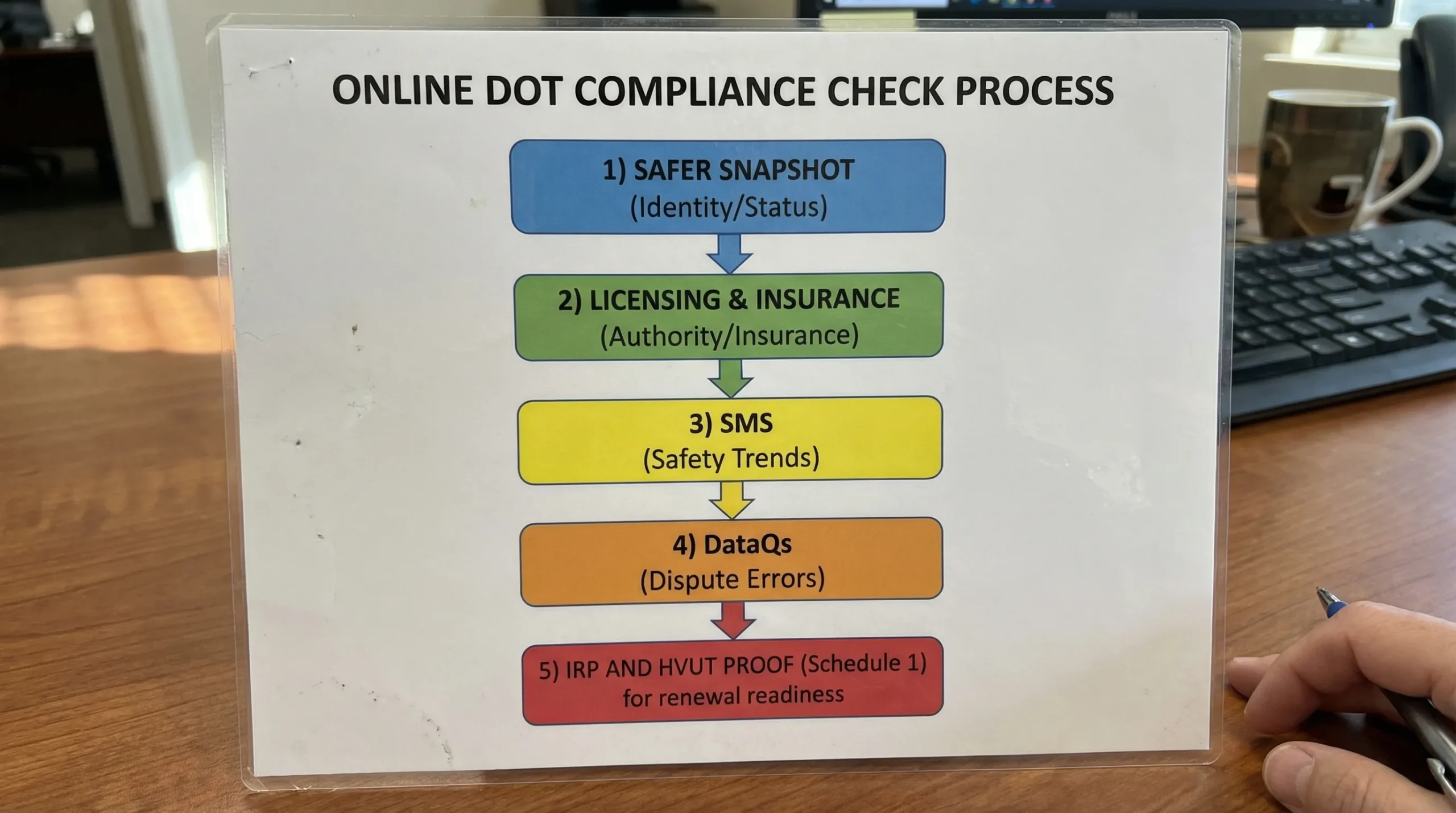
If you spot an inspection or crash record you believe is inaccurate, your “fix loop” is DataQs.
Use: FMCSA DataQs
Practical guidance:
- Move quickly. The longer incorrect data sits, the more it influences trend perception.
- Be evidence-driven. Upload documents, repair orders, inspection reports, or other supporting materials.
This is a major 2026 compliance trend: fleets that treat data quality as an operational discipline (like fuel management) tend to reduce “mystery” compliance issues later.
Step 5: Connect DOT compliance to IRP and HVUT (the renewal bottleneck most people miss)
Many compliance headaches are not purely “DOT.” They happen at renewal time, when systems and agencies intersect.
For IRP renewals, jurisdictions frequently require proof of HVUT payment for taxable vehicles, typically the 2290 Schedule 1 for IRP. In practice:
- If you are renewing plates, adding a truck, or changing registered weight, Form 2290 and IRP registration become linked through documentation.
- If your schedule 1 form 2290 due date is missed, you can end up with delayed tags, even if your DOT side looks clean.
If you need to file, amend, or retrieve your stamped Schedule 1 quickly, an IRS-authorized platform matters. Simple Form 2290 (sometimes searched as “Simple 2290”) is an IRS Authorized E-file Provider built to help owner-operators and fleets electronic file form 2290 and pay online, then download and store proof for renewals.
This is also where accuracy pays off:
- Correct VINs on your filing (VIN errors can slow IRP proof).
- Correct taxable gross weight category.
- File Taxable Weight Amendments when needed, especially if a truck’s registered weight increases and you need updated proof.
If your operation includes multiple units, look for bulk and fleet filing capability so HVUT proof does not become a manual spreadsheet fire drill.
A 2026 “operator-grade” compliance routine (simple, repeatable)
Most compliance blowups are not caused by one catastrophic mistake. They come from not checking basics often enough.
| How often | What to check | Tool |
|---|---|---|
| Weekly | Any new inspections, violation patterns, emerging BASIC issues | FMCSA SMS |
| Monthly | Authority and insurance continuity, company snapshot consistency | SAFER + L&I |
| Before IRP renewal or adding vehicles | HVUT proof and VIN/weight accuracy | Your records + Form 2290 Schedule 1 |
| Immediately when errors appear | Dispute incorrect data | DataQs |
One operational comparison worth making: paper-based compliance habits versus dashboard-based habits. Paper habits rely on remembering where something was saved. Dashboard habits rely on logging in, downloading what you need, and keeping a clean audit trail (including keeping your IRS e-file login credentials organized for anything tax-related).
Choosing what to fix first (triage table)
| What you see online | What it usually means | What to do next |
|---|---|---|
| Snapshot info is outdated | MCS-150 data not current or mismatched | Update your registration info and standardize your business identity documents |
| Authority shows problems | Administrative/filing issue, or insurance not properly on file | Verify filings in L&I, talk to your insurer/agent, resolve gaps immediately |
| SMS shows rising maintenance violations | Preventive maintenance and DVIR discipline are slipping | Focus training, tighten maintenance intervals, address repeat violations |
| Incorrect inspection record | Data quality issue impacting your risk profile | Open a DataQs case with evidence and track the outcome |
| IRP renewal blocked for HVUT | Missing or incorrect Form 2290 Schedule 1 | E-file Form 2290, confirm VIN/weight, download stamped Schedule 1 |
FAQ (AEO-friendly)
How do i check my dot compliance online? Start with FMCSA SAFER (company snapshot), then verify authority and insurance in FMCSA Licensing & Insurance, review safety trends in FMCSA SMS, and correct errors through DataQs.
What is the fastest website to confirm my DOT status? The FMCSA SAFER Company Snapshot is typically the fastest public check for USDOT details and visibility.
Does DOT Compliance mean the same thing as my CSA score? Not exactly. CSA/SMS safety data is one part of DOT Compliance, but authority status, insurance filings, and accurate registration information are also critical.
What should I do if my inspection data is wrong online? Use FMCSA DataQs to dispute the record, attach supporting documents, and monitor the case until it is resolved.
Do I need Form 2290 Schedule 1 for IRP truck registration? In many IRP jurisdictions, yes. A stamped Schedule 1 is commonly used as proof of HVUT payment for renewals, additions, and certain registration actions.
How can I get a stamped Schedule 1 quickly for IRP? E-filing through an IRS Authorized E-file Provider can speed up delivery and retrieval. Simple Form 2290 is one option designed to e-file Form 2290 online and provide fast access to your Schedule 1 for IRP documentation.